


With so many balls to juggle, designers need to be as organized, efficient, and productive as possible. So, here are 10 productivity tips for designers.
Being productive is essential for working better especially when you are creative.
Graphic designers have a lot to do and sometimes it can take a toll on their routine, work efficiency, and health. Trying to do too much can also put you in a productivity trap, and you may end up procrastinating and wasting time.
But to save your day, we have come up with 10 productivity tips and hacks that will help you achieve your goals on time and with efficiency.
Let’s get started!
1. Set Clear & Realistic Goals
Designers, as creative individuals, can find it difficult to stay on task and complete tasks on time. However, having a clearly defined objective and a plan for getting there can help a lot.
Setting goals for oneself could lead to more productivity. You can keep your focus on the task at hand by setting concise, attainable goals.
Your desire to keep moving forward will increase as you get closer to your goal. The more determined you are to succeed, the more effort you will put forth. As a result, you can develop and learn, making the work more enjoyable for you.
2. Create a To-Do List
The best way to stay on top of your tasks and daily/weekly/monthly goals is to create a to-do list. Planning out all of your work and tasks from different projects you need to work on in advance makes it easier to stay organized and hold yourself accountable. You will have a plan ready to refer to and make sure you’re on the track.
The best way to do this is by utilizing free online project management software and task management apps like SmartTask, Todoist, etc. These apps allow you to set your goals, create to-do lists of all you need to do, create tasks and subtasks accordingly, centralize all your communication related to your work, and easily track the due dates, progress, and milestones.
Additionally, incorporating useful project plan templates can further streamline your planning process, providing a structured framework for organizing tasks and ensuring efficient project management.

3. Use Time Management Techniques
Adopting the right time management techniques help professionals work more efficiently, streamline their workflows, and work better. Here are some of the techniques that can help you get more organized and productive:
GTD or Get Things Done
This process works to help you move planned tasks aside by recording them on a piece of paper and then breaking them down into actionable work items. You can also do this with the help of a to-do list app. The GTD approach consists of five straightforward practices: capture, clarify, organize, review, and engage.
Pomodoro Technique
With this method, you divide your job into timed segments (generally 25 minutes) using a timer. Each interval is referred to as a “Pomodoro,” named after the tomato-shaped timer that Cirillo created. After each Pomodoro, you can take a short break (generally 5 minutes) and come back. This technique works well for creative thinkers.
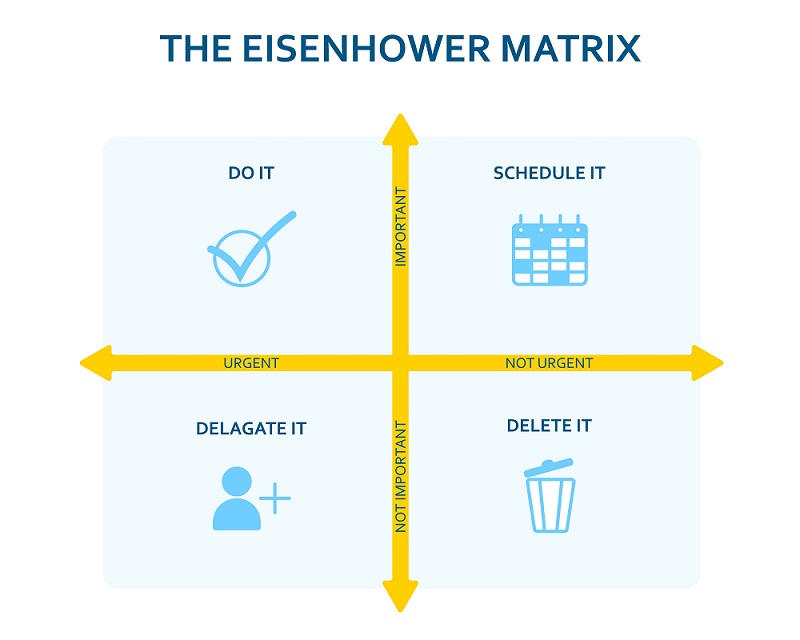
The Eisenhower Matrix
The Eisenhower Matrix is a decision-making tool that helps you decide between tasks that are important, not important, urgent, and not urgent. It divides tasks into four boxes that indicate which you should focus on first and which you should delegate or delete.
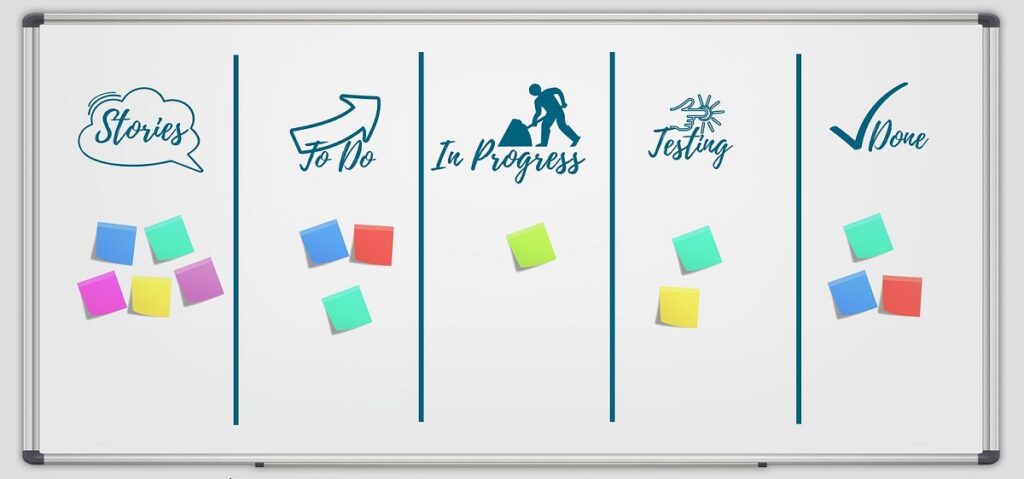
Kanban
People can see all the work they need to perform at once thanks to Kanban, which uses the power of visualization. A kanban board is a tool being utilized, and the tasks are organized in columns that show where they are in the execution process. The to-do, in-progress, and done columns are on the simplest Kanban board. Kanban is efficient because it enables you to concentrate on and complete your most crucial activity before moving on to the next.
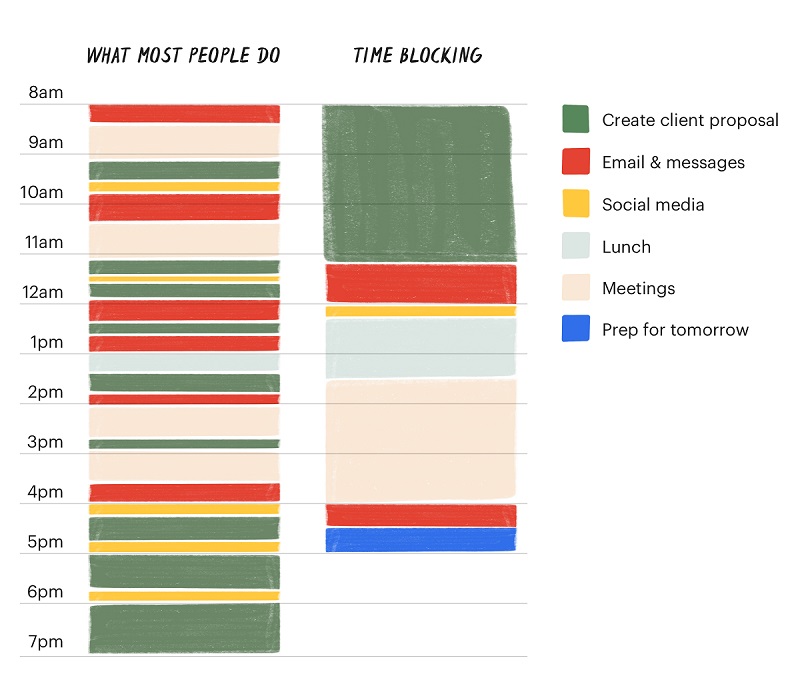
Time Blocking
Time blocking is a planning technique that breaks up your day into smaller timepieces. You concentrate on a single activity or a set of related tasks for the duration of each block of time. By focusing solely on the task at hand, your tasks are finished faster and with greater precision.
4. Make Use of the Right Technology
Technology has drastically changed the way things work, and the same is true for graphic designers. Now there are plenty of tools on the market that help designers get the most out of their efforts while saving a lot of time. If you work on a Mac, consider using a powerful and effective Mac cleaner to optimize the performance of your device.
There are productivity tools that help with planning, organizing, and time tracking (SmartTask, Todoist, TimeCamp) which enables you to focus on the actual work rather than just understanding what should be done. Then there are collaboration and communication tools that aid in efficient collaboration and communication with designers, teams, and clients (Slack, Zoom, Discord). For efficient time management and task coordination, consider utilizing online appointment scheduling software alongside these productivity tools to streamline your daily schedule.
Again, choosing the right design software as per your skills and expertise is also very important for better productivity and ease of work. For example, if you are a beginner and don’t know much about designing, tools like Colorcinch can be the right one to start with. Or if you want to sketch, draw or convert your handwriting to text, you need a pad that allows you write on a laptop digitally. And if you need to create eye-catching flyers or banners to market your brand, why not utilize a flyer maker.
So, make sure you know what areas you need help in and pick the tools accordingly to streamline your graphic design process.
5. Build a Healthy Routine
The most important thing is to develop a routine during working hours. Your routine should have room for everything from taking breaks to having lunch to taking care of your health. Also, while working in a proper routine and environment, you will find yourself more focused and productive.
If you don’t fix certain work hours and daily routines, you will end up doing one task in another’s time, stretching your work hours throughout the day, and leaving less time for your personal life.
In short, you will end up disrupting your work-life balance, which can eventually lead to bigger issues such as dissatisfaction, reduced productivity, mental stress, and more.
6. Reduce Digital Distractions
Falling down the rabbit hole of using social platforms at work can be extremely tempting and distracting.
So, if you are constantly checking your emails and messages, it is a concern in terms of productivity, and you end up wasting time that could have been spent on producing more quality work.
To avoid such scenarios, you need to minimize your digital interactions. You can plan a certain time slot for just checking email and messages, etc., and turn off the social alerts and notifications for the rest of the time to concentrate better on work.
7. Keep Moving
If you’re working in a creative role, it’s important to declutter your mind and keep the flow of fresh thoughts and ideas coming in. But the longer you work on the designs without taking breaks or doing anything else at all except working, the more sedentary your mind and body become.
However, the best way to get out of the clutter is to stay active, and having a regular fitness routine has enhanced my productivity.

8. Take Care of Your Mental Health
Mental health problems are experienced by 1 out of 6.8 in the workplace. And 12.7% of all sickness absence days are due to mental health conditions.
There will always be certain circumstances that might hamper your mental health and productivity. So you should consider these factors and understand the balance between our state of mind and work. Patience and time efficiency are often key personality traits in these situations.
Always remember that it is your mental health that comes first, and if you are mentally healthy, you can think better and work better.
9. Take Regular Breaks
Most of us spend our workdays sitting at our desks, chained to our cubicles, straining our eyes in front of the computer screen, hoping for more. But on the contrary, overworking or not taking breaks in between leads to reduced productivity, stress, and bad mental health, ultimately hampering overall performance.
Stepping out of the chaos of the workday not only gives our minds but also all our other senses a much-needed break. Taking adequate breaks throughout the workday also improves focus significantly.
You can plan your lunch or go for a walk when you feel drained or distracted. These breaks will also help you clear your mind and boost your creativity level, which is very important for graphic designers.

10. Stay Away from Unproductive Meetings
We now work in a more collaborative environment, and graphic design undoubtedly entails attending numerous meetings to discuss plans, issues, work briefs, feedback, and so on.
But there are times when the meeting can turn into an unproductive discussion that leads to a lot of wasted time, confusion and reduced productivity.
To avoid this, make sure you have a clear idea of what you want to discuss, and invite only the necessary people and decision-makers to the meeting. Also, avoid adding too many people to the meeting, which can unnecessarily stretch the meeting.
Wrapping Up
Graphic designers are required to produce a greater amount of work every day, either individually or as a team. It can take a lot of time to complete a design project if you are not well-prepared or often find yourself procrastinating.
And adopting the right practices will help you stay on track. So, following the above productivity tips will help you fight procrastination, get more work done on time, and maintain a healthy work-life balance.
About Guest Author: Shyamal Parikh
Shyamal is the Founder of SmartTask, an online work management/automation software. He actively shares strategies and techniques that improve a team’s productivity.
