


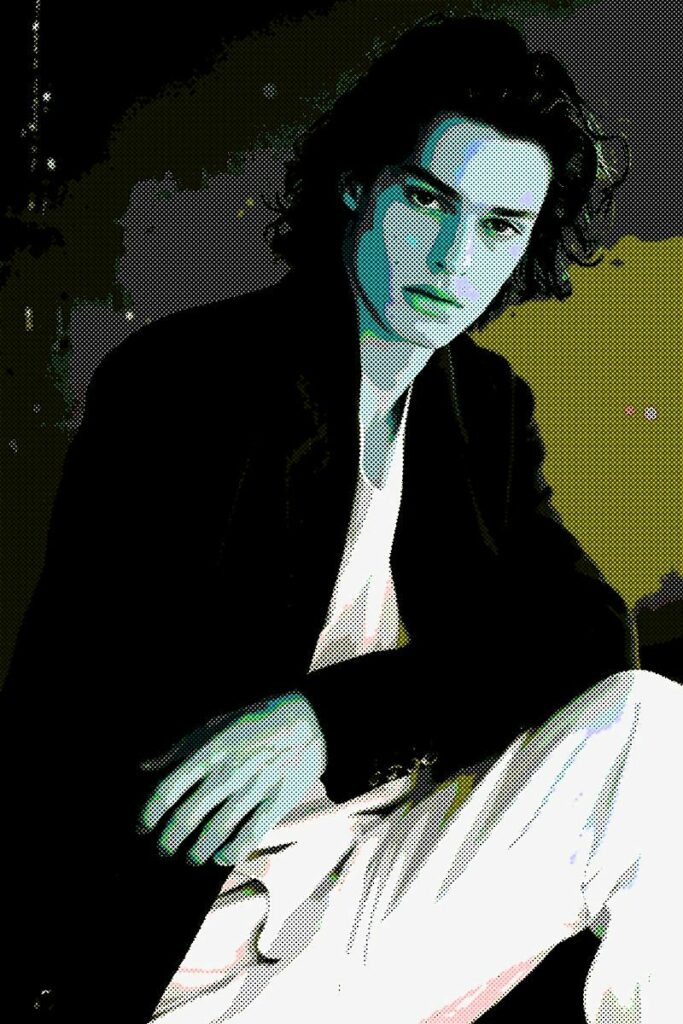
Some photos deserve more than a quick post on social media. They deserve to be displayed, shared, or even printed as artwork.
That’s exactly what makes photo to poster art so appealing. Instead of preserving every tiny detail, poster art transforms an ordinary image into something graphic, expressive, and impossible to ignore. Bold colors replace subtle tones, shadows become more dramatic, and familiar scenes take on an artistic style that feels straight out of a gallery or vintage print shop.
The best part? You don’t need professional design experience to create the effect. With today’s AI-powered photo editors, you can turn almost any image into striking poster art in just a few clicks.
Whether you’re refreshing your Instagram feed, creating custom wall art, designing a unique gift, or simply experimenting with your photography, poster art is an easy way to give your favorite images a whole new personality.
In this guide, you’ll learn what poster art is, how to create it, and a few simple techniques that can make your finished design look even better.
What Is Poster Art?
Poster art is a graphic illustration style that simplifies a photograph into bold shapes, strong contrast, and vibrant colors. Rather than capturing every texture and tiny detail, it emphasizes the elements that make an image visually memorable.
The style has been around for decades, appearing in everything from vintage travel advertisements and movie posters to political campaigns, concert promotions, and pop art. While traditional poster artists relied on screen printing and illustration techniques, modern editing tools recreate the same bold aesthetic digitally in seconds.
The result is artwork that feels clean, dramatic, and intentionally designed rather than simply photographed.
One of the reasons poster art has remained popular is its versatility. A portrait becomes a modern art print, a city skyline looks like a travel poster, and even a casual snapshot of your dog can become a colorful piece of artwork worth framing.
Why Convert a Photo Into Poster Art?
Sometimes, a beautiful photo gets lost among hundreds of others in your camera roll. Turning it into poster art gives it a second life.
Because poster art simplifies visual details while emphasizing color and contrast, it naturally draws attention. That’s why it’s commonly used in advertising, branding, and digital content where making a strong first impression matters.
It’s also a fun way to express your creativity. Instead of editing a photo to look more realistic, you’re transforming it into something artistic and uniquely your own.
Many people use poster art to create custom home décor, personalized gifts, eye-catching social media graphics, event promotions, or artwork for print-on-demand products. It’s an easy way to make ordinary photos feel far more intentional and memorable.
How to Turn Any Photo Into Poster Art
Creating poster-style artwork is much easier than most people expect. Cartoonize photo editor does the heavy lifting, allowing you to focus on choosing the look you love.
Step 1: Upload Your Photo
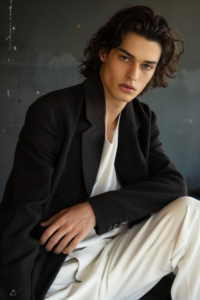
Start by selecting a high-quality image. Photos with good lighting and a clear subject usually produce the strongest results because the editor has more detail to work with.
Portraits are always a great choice, but landscapes, architecture, pets, travel photos, cars, and street photography also translate beautifully into poster art.
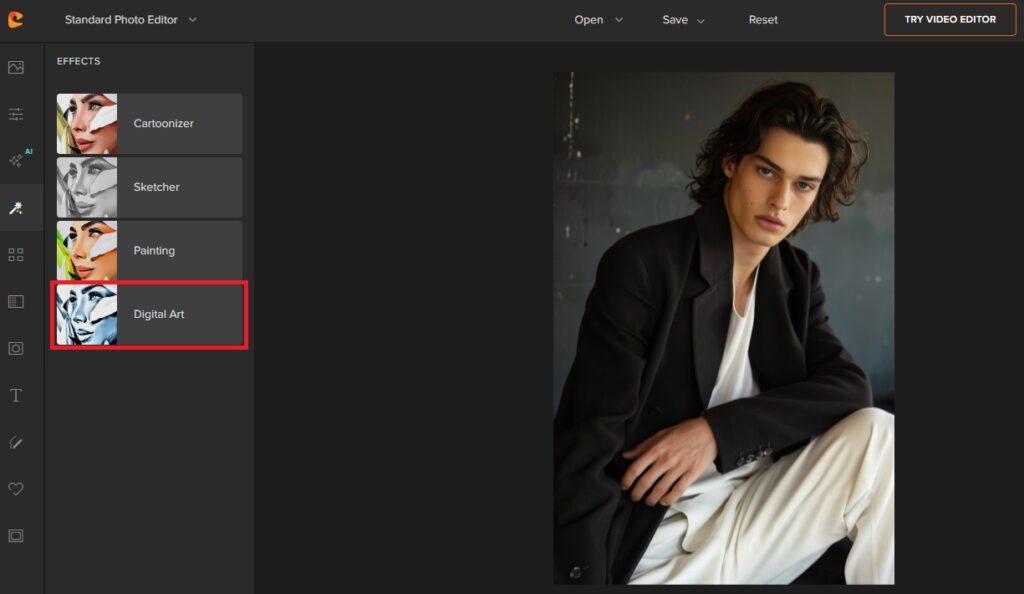
Step 2: Apply a Poster Art Effect
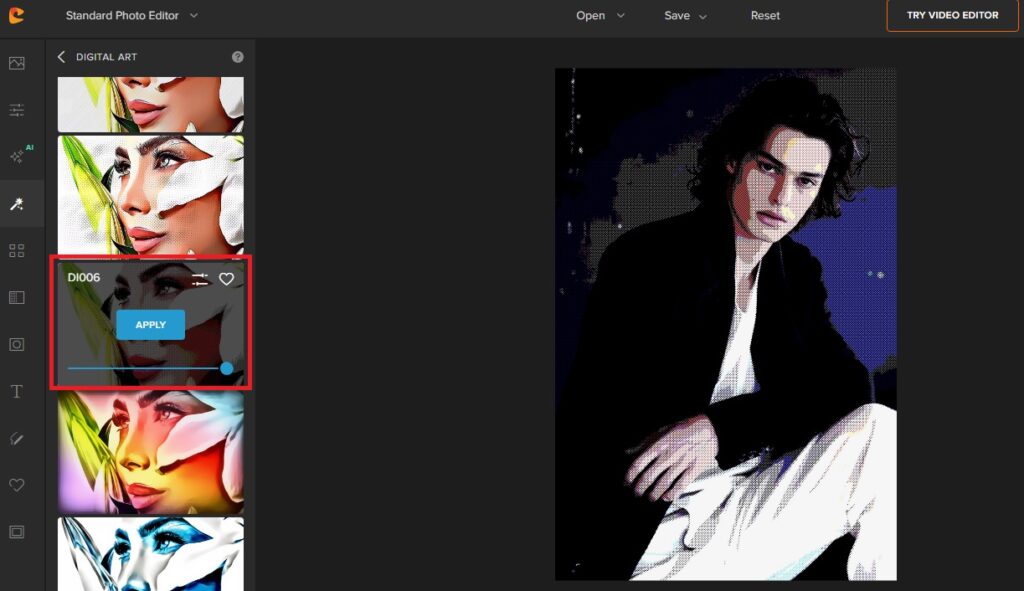
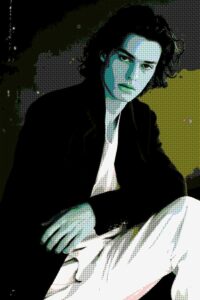
Click Effects > Digital Art and explore Cartoonize’s Image Posterizer effects. You’ll find two posterization styles—DI006 and DI007—each offering its own unique take on poster art. Preview both to see which one best complements your photo.
One style may create a classic vintage poster look, while the other leans toward bold graphic art with stronger contrast and simplified colors. The best choice ultimately depends on the mood and artistic style you’re going for.
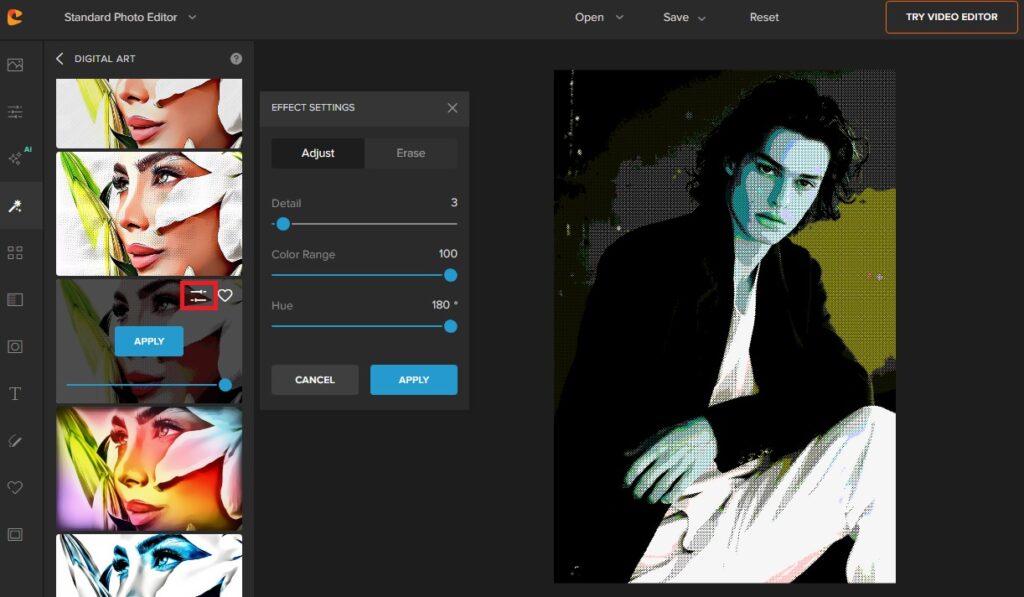
Step 3: Customize the Look
Applying the Image Posterizer is just the beginning. Fine-tuning the settings lets you create artwork that matches your personal style.
Adjust the Detail slider to control how much of the original image is preserved, then experiment with the Color and Hue settings to change the overall palette and mood of your poster. Whether you’re aiming for vibrant pop art, a vintage-inspired print, or a more modern graphic look, these simple adjustments can completely transform the final result.
A few thoughtful tweaks can make the difference between an image that simply has a filter applied and one that feels like a custom piece of poster artwork.
Step 4: Save and Share Your Design
Once you’re happy with the final result, save your image in the highest resolution available. This ensures your artwork stays crisp whether you’re posting it online or printing it as a poster, canvas, or framed piece.
Choosing the Right Photo Makes a Difference
Not every photo transforms in exactly the same way. While poster effects work on almost any image, some photographs naturally produce more striking artwork.
Images with strong lighting tend to create cleaner contrast between highlights and shadows, giving the finished piece more depth and visual impact. Likewise, photos with a clear subject are easier to recognize after the artistic transformation.
Portraits remain one of the most popular choices because facial features stay recognizable even after colors become simplified. Travel photography, skylines, flowers, pets, and classic cars also work particularly well thanks to their bold shapes and distinctive silhouettes.
If possible, avoid blurry or heavily compressed images. Starting with a high-resolution photo gives the editor enough detail to create smoother edges, cleaner color transitions, and a more polished final design.
Simple Tips for Better Poster Art
Great poster art isn’t just about applying the strongest filter available. Often, the most impressive results come from making thoughtful adjustments that enhance the image without overwhelming it.
Begin with the highest-quality photo you have. A sharp image provides more information for the editor to interpret, resulting in cleaner artwork and richer colors.
Don’t feel obligated to maximize every editing slider. Sometimes a subtle poster effect looks far more sophisticated than an overly stylized one. Gradually increase the intensity until your photo feels artistic while still preserving its original character.
Color also plays a major role. Poster art naturally benefits from bold, vibrant palettes, but limiting the number of dominant colors often creates a cleaner and more professional appearance.
Finally, pay attention to composition. Cropping unnecessary distractions before applying the effect helps direct the viewer’s attention exactly where you want it.
Creative Ways to Use Poster Art
One of the best things about poster art is that it isn’t limited to digital images. Once you’ve created your design, there are countless ways to put it to use.
Custom wall art remains one of the most popular options. A favorite travel photo, family portrait, or landscape instantly feels more personal when displayed as bold poster artwork. Creating a series using the same editing style can also give your space a cohesive, gallery-inspired look.
Poster art also makes memorable personalized gifts. Instead of giving someone a standard printed photograph, you can turn a meaningful memory into artwork they’ll actually want to display.
If you create content online, poster art offers an easy way to stand out on crowded social media feeds. The simplified colors and graphic style naturally catch people’s attention while giving your content a more polished visual identity.
Small business owners, photographers, musicians, and artists often use poster-style images for promotional graphics, event posters, and branding because the bold aesthetic feels both creative and professional.
You can even print your artwork on T-shirts, tote bags, phone cases, notebooks, or stickers, making poster art an excellent choice for custom merchandise or personal projects.
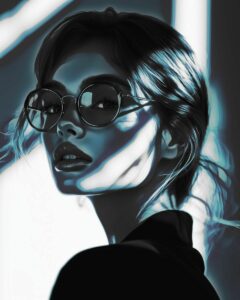
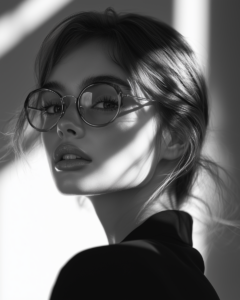
See image porterizer in action
Why AI Makes Poster Art Easier Than Ever
Not long ago, creating poster art required advanced editing skills and hours of manual work. Designers carefully adjusted colors, traced outlines, simplified shapes, and experimented with multiple layers before achieving the final result.
AI-powered editing has completely changed that process.
Instead of spending hours recreating artistic techniques by hand, today’s intelligent photo editors analyze your image automatically and apply sophisticated poster effects in seconds. You still have creative control over the final look, but the technical work happens behind the scenes.
That means anyone—from complete beginners to experienced photographers—can create artwork that looks polished without investing countless hours learning complex design software.
Frequently Asked Questions
Can any photo be turned into poster art?
Yes. Most photos can be transformed into poster art, although images with good lighting, clear subjects, and higher resolution usually produce the most impressive results.
Can I print my poster artwork?
Absolutely. Saving your image at a high resolution allows you to print it as a poster, canvas, framed artwork, or even custom merchandise without sacrificing quality.
What photos work best for poster effects?
Portraits, pets, travel photos, architecture, city skylines, flowers, and landscapes are all excellent choices because they have bold shapes and recognizable subjects that translate well into graphic artwork.
Is poster art only for artists?
Not at all. Cartoonize Image Posterizer make it easy for anyone to create poster-style artwork, even if they’ve never used design software before.
Turn Your Favorite Photos Into Bold Poster Art
Every great photo tells a story, but poster art gives that story an entirely new personality. Whether you’re decorating your home, designing social media graphics, creating personalized gifts, or simply exploring your creativity, transforming a photo to poster art is one of the easiest ways to make your images stand out.
If you’re ready to give it a try, Cartoonize’s Image Posterizer makes the process fast, intuitive, and fun. Upload your favorite photo, experiment with different poster styles, and watch an everyday image become bold artwork you’ll be proud to share. This feels much more natural than a hard sell, while still showing readers exactly how they can achieve the effect.
